

Key Takeaways
Zendesk announced that Zendesk Sell CRM will officially sunset in August 2027, requiring current users to migrate to alternative CRM platforms before the retirement date.
Copper CRM offers the strongest Google Workspace integration with native Gmail functionality and includes a Zendesk integration that displays support ticket details directly within the CRM interface.
Close CRM provides built-in calling, SMS, and email capabilities with power dialer features, making it the top choice for outbound sales teams that rely heavily on phone-based prospecting.
HubSpot Sales Hub delivers robust automation features and a generous free tier, though pricing escalates quickly as teams add users and unlock advanced functionality.
If you’'re currently using Zendesk Sell (formerly Base CRM), you've likely heard the news: Zendesk has announced that Sell will officially sunset in August 2027.
The writing was on the wall. Despite years of effort to merge Sell and Support into a unified platform, the two products stayed siloed — leaving customers bouncing between systems instead of working from one clean source of truth.”
That may feel far off, but for businesses that depend on Sell, the clock is ticking. Here's the good news: the CRM landscape today is more competitive than ever, with options that won't just match what you had — they'll likely exceed it.
CRM alternatives at a glance
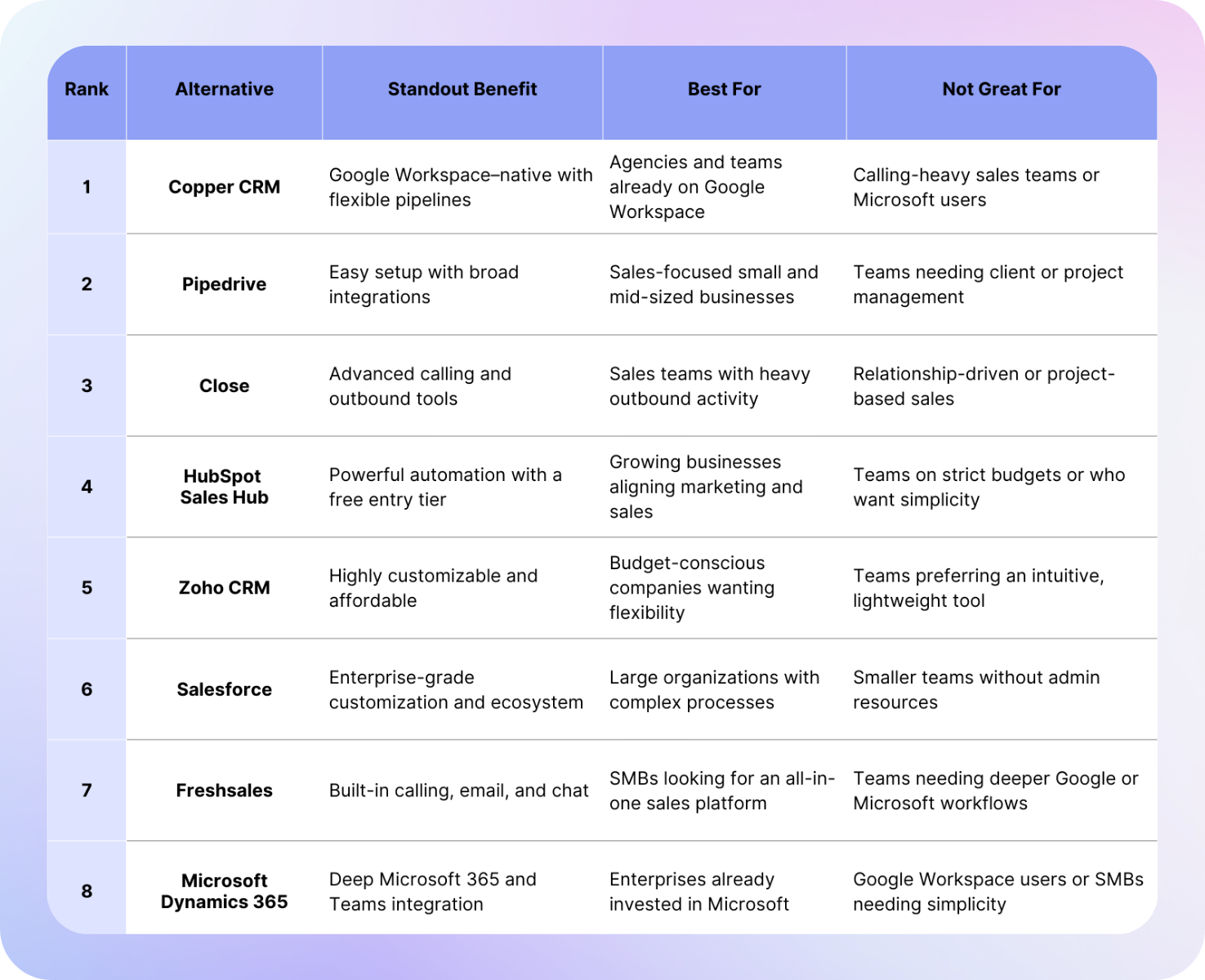
1. Copper CRM — Best choice for Google Workspace users
If your team lives in Gmail, Google Calendar, and Drive, Copper is a no-brainer.
Most CRMs say they integrate with Google Workspace. Copper was actually built inside it. That means you can manage your entire sales process without ever leaving your inbox:
- Add leads directly from Gmail: No switching tabs or copy-pasting contact info
- Track opportunities in real time: See deal status alongside email threads
- Log activities automatically: Emails, meetings, and files sync without manual entry
Now, one of the biggest anxieties Zendesk Sell users share? Losing visibility into what the support team is saying to customers.
Copper solves this with a native Zendesk integration that surfaces ticket details right inside the CRM. Sales teams can see open and past support cases linked to a contact or account without ever leaving Copper, which encourages team collaboration and ensures that customer conversations don't fall through the cracks.
Copper's flexible pipelines let you run both sales and project workflows in one place. Automations keep reps on top of follow-ups, while dashboards give leadership a clear view of performance.
In short: it's built to keep your team moving forward, not chasing down details.
- Deep Google Workspace integration
- Zendesk support ticket integration
- Flexible pipelines for sales and projects
- Intuitive interface
- Mobile apps for iPhone and Android
- LinkedIn integration
Cons:
- Only supports Google Workspace (not Microsoft 365)
- No native calling tools (requires JustCall or RingCentral)
- Does not support mass outbound email
Copper CRM's Drag and Drop Pipelines
2. Pipedrive — Great for migration flexibility
Pipedrive is another solid option, especially for teams that want a CRM that keeps things simple and sales-focused. Its visual pipelines are a fan favorite and make it easy to see exactly where deals stand at a glance.
One big plus: Pipedrive is an official migration partner for Zendesk Sell.
Translation? They've put real effort into making the switch painless, which is a huge relief if your team's already stressing about data transfers and setup.
Add in their marketplace of 450+ integrations, and you've got a CRM that can slot into almost any sales stack without much fuss.
But here's the tradeoff: Pipedrive is laser-focused on sales. That's great if closing deals is your only priority, but it also means you won't get project tracking or the deeper Google Workspace magic you'd find with Copper. So if your team needs a CRM that can carry you from first pitch all the way through post-sale workflows, Pipedrive might leave you wanting more.
- Easy-to-use interface
- Strong visual sales pipelines
- Powerful lead management
- Official Zendesk migration support
- Large integration library
Cons:
- Sales-only focus
- Lacks project management features
- Limited native automation compared to larger CRMs
- Does not support phone calls
Pipedrive's Pipelines feature
3. Close — Calling and outbound sales powerhouse
If your team loved Zendesk Sell for its built-in calling tools, then Close may be your best bet.
Close was designed with inside sales teams in mind, and it comes with calling, SMS, multi-channel and email all baked into the platform. This gets rid of the need for third-party telephony tools and keeps everything in one place.
Close also includes productivity features like power dialer functionality and predictive dialer, helping reps make more calls in less time. Combine that with email sequences and activity tracking, and it's a strong choice for omni-channel teams, or outbound-heavy sales teams that live on the phone.
Where Close can fall short is for teams that need more flexible pipelines or project management features. It's highly effective for prospecting and outbound, but not always as strong for relationship-based selling or managing client delivery after a deal closes.
- Built-in calling, SMS, and email
- Power dialer features
- Great for outbound sales teams
Cons:
- Less suited for post-sale or project-driven teams
Close.io Pipelines list
4. HubSpot Sales Hub — Automation-rich with a generous free tier
HubSpot has long been known for its marketing automation, but its Sales Hub has grown into one of the most popular CRMs on the market. Its free tier makes it easy for small teams to experiment before upgrading.
The real power lies in automation. Sales teams can offload repetitive tasks like:
- Lead assignment and routing
- Follow-up email sequences
- Automatic deal creation
- Dashboard and reporting updates
And if you're already using HubSpot's Marketing Hub, adding Sales Hub feels like leveling up. Marketing and sales finally share one smooth system, which means leads don't just get handed over.
The trade-off is cost. As your team grows and you unlock more advanced features, HubSpot pricing can scale quickly. Some companies find themselves paying significantly more than they originally planned as they add users or features.
- Robust automation
- Free entry-level CRM
- Seamless marketing and sales alignment
- Scalable
Cons:
- Pricing escalates quickly
- Advanced features may require expensive upgrades
HubSpot CRM
5. Zoho CRM — Flexible and budget-friendly
While Zoho CRM is often overlooked, it delivers impressive value. It's highly customizable, allowing you to tailor pipelines, dashboards, and workflows to match your exact business processes.
It also includes an AI assistant called Zia, which can give recommendations and predictions to help guide sales teams.
Perhaps the biggest draw is pricing. Zoho is one of the most cost-effective CRMs on the market, making it attractive for small businesses or those with tighter budgets. At the same time, its feature set is broad enough to compete with much more expensive platforms.
The downside, though, is that Zoho can feel more complex to set up and use. The interface isn't as polished as Copper or Pipedrive, and it may require more administrative effort to configure properly.
- Affordable
- Highly customizable
- AI-powered insights
- Broad feature set
Cons:
- Steeper learning curve
- Less intuitive interface
- Setup can be time-intensive
Zoho CRM Dashboards
6. Salesforce — Enterprise-grade powerhouse
No list of CRM alternatives would be complete without Salesforce, the global leader in CRM.
Salesforce offers virtually unlimited customization, from custom objects to advanced workflow automation, AI-powered forecasting, and integrations with thousands of apps. For organizations with complex sales processes, Salesforce provides the flexibility and scale needed to handle growth.
That said, Salesforce can be overwhelming for smaller teams. You'll often need dedicated admins to configure and maintain it. The cost is also high compared to other CRMs on this list.
- Enterprise-level customization
- Powerful automation
- Extensive ecosystem
Cons:
- Expensive
- Steep learning curve
- Often requires dedicated admin support
Salesforce CRM account records
7. Freshsales — All-in-one sales engagement
Freshsales is a strong pick if you're looking for a true all-in-one hub. It bundles core CRM features with built-in calling, email, and chat, so sales teams can manage conversations without having to jump between tools.
On top of that, its AI-driven lead scoring and deal insights help reps zero in on the opportunities that actually matter. And compared to heavyweight systems like Salesforce, Freshsales tends to be far easier to roll out and get your team using quickly — which is no small win when adoption is half the battle.
Freshsales may not have the same level of ecosystem depth as HubSpot or Salesforce, but for growing SMBs, it strikes a great balance of functionality and affordability.
- Built-in communication tools
- AI insights
- Affordable pricing
Cons:
- Less extensive integration ecosystem
- Weaker at project workflows
Freshsales Pipelines
8. Microsoft Dynamics 365 — Best for Microsoft ecosystem users
For businesses that run on Microsoft 365 rather than Google Workspace, Dynamics 365 is worth considering. It integrates tightly with Outlook, Teams, and the larger Microsoft ecosystem, making it attractive for enterprise companies already invested in Microsoft software.
Dynamics 365 offers advanced sales forecasting, AI insights, and customization options similar to Salesforce, but with native Microsoft connections. However, it's often seen as complex and more enterprise-focused than SMB-friendly.
Pros:
- Deep Microsoft 365 integration
- Robust customization
- AI and forecasting
Cons:
- Complexity
- Enterprise pricing
- Less intuitive than Google-focused CRMs
Microsoft 365 Dynamics reports
Final Thoughts
At the end of the day, the "right" CRM depends on how your team works and where you want to go next. Each platform has its strengths, and the best fit comes down to your priorities:
- If you're a Google Workspace team → Copper is the best fit with native integration and Zendesk ticket visibility. Try it free for 14 days.
- For sales-driven teams that want quick migration → Pipedrive offers clarity and ease.
- If calling is your core → Close or Freshsales will feel familiar.
- If you want to scale with automation → HubSpot or Salesforce are excellent bets.
- If you're budget-conscious or a Microsoft shop → Zoho or Dynamics 365 could be the right move.
No matter which path you take, the goal isn't just replacing Zendesk Sell — it's choosing a CRM that will grow with your team and support your workflows for the long term.